5 Whova Alternatives for 2026
Looking for a Whova alternative? Here's how Highbar and other event app platforms compare on setup, pricing, attendee experience, and design.
Alternative Landscape
Whova competes in the mid-market event app space alongside several other platforms. Here's a quick look at the most common alternatives event organizers consider:
EventMobi - Established mid-market full-service vendor. Broad feature set and onboarding support, but dated UX and a multi-week sales-assisted setup. Read our full EventMobi comparison →
Guidebook - One of the original event app platforms. Simple and affordable but limited in AI and analytics capabilities. Read our full Guidebook comparison →
PheedLoop - Canadian competitor with a similar all-in-one approach. Good for hybrid events but complex setup process.
Amego - Newer entrant focused on attendee engagement. Worth watching but still building out core features.
Highbar - AI-native event app platform. Self-serve setup, flat-rate pricing, and a conversational attendee experience that replaces the traditional menu-and-icon approach. That's us, and we'll go deeper below.
Snapshot
Whova has been one of the most recognized names in event apps since it launched out of UC San Diego in 2013. It powers 50,000+ events across 100+ countries, with a customer list that includes Google, Microsoft, Hilton, Harvard, and NASA. Its strongest verticals are academic conferences and professional associations, and it has earned the Event Technology Award nine years running. That is a real track record, and it is worth saying plainly.
Whova's entire identity is built around networking. The platform was founded specifically to help attendees find the right people to meet, and every major product decision runs through that lens: SmartProfile enrichment, community boards, meetup scheduling, matchmaking suggestions. If the primary job you need your event app to do is get attendees connected, Whova has spent over a decade thinking about that problem.
The trade-off is complexity. The same breadth that makes Whova powerful makes it dense. And the networking model, while genuinely useful, still puts the work on the attendee: browse profiles, scan community boards, send a cold in-app message, and hope for the best. It is a significantly better version of a conference name badge, but it is still fundamentally a directory. Highbar's networking agent works differently.
App Creation
Whova follows the standard enterprise event app model: a sales touch before you can get started, and manual content entry from there. Highbar lets you build and publish yourself in about 45 minutes.
Request a quote, book a demo, get assigned an event consultant
Self-guided, step-by-step setup
Manually build sessions, speakers, sponsors, and documents across separate modules
Upload or connect your content once
Extensive admin panel; powerful but time-consuming to configure
Let AI automatically structure and power the experience
Requires a signed contract before you can go live
Publish your app in about 45 minutes
Custom per-event quote, gated behind a sales call. Add-ons billed on top
Free to build and launch. Pay only for engaged attendees, capped at $9,500
Whova's path to getting started runs through their sales team. You submit event details, a consultant follows up with a demo, and pricing comes after that. There is a trial account available, but access requires going through the demo flow first. Reviewers have noted that Whova's admin tools, while comprehensive, require significant time to configure and are not always intuitive, particularly for teams running smaller events. One recurring theme is that managing attendees in groups and sending customized messages requires more manual work than expected.

With Highbar, you sign up, follow a step-by-step wizard, and publish in about 45 minutes. No demo. No sales call. No consultant assigned to your account.
.avif)
Experience
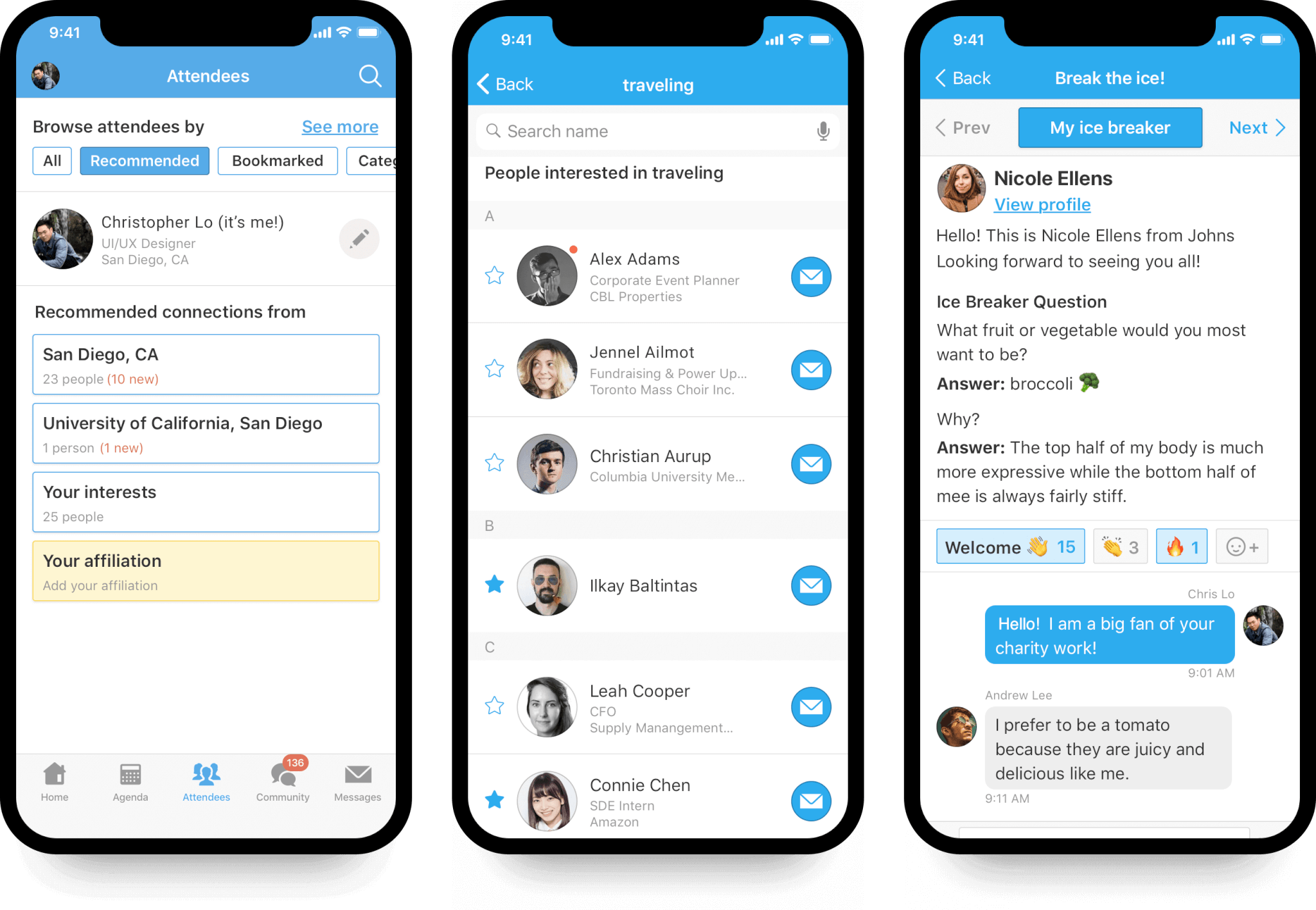
Whova: Tab-Based Navigation and Browse Networking
Whova delivers what attendees expect from a classic event app:
- A bottom navigation bar with dedicated tabs for Agenda, Community, and Resources
- Networking through SmartProfile browsing: attendees scan enriched profiles, post to Community Boards, and send direct messages
- Separate sections for sessions, speakers, sponsors, floor maps, and documents
While functional, this experience puts the work on the attendee. They open the app, find the right tab, and search. The networking layer surfaces profiles enriched by SmartProfile, but still asks attendees to initiate contact with strangers from a list. Most people who would benefit from connecting never do, because that friction is real even inside a polished interface.
Highbar: AI‑Native, Conversational Experience
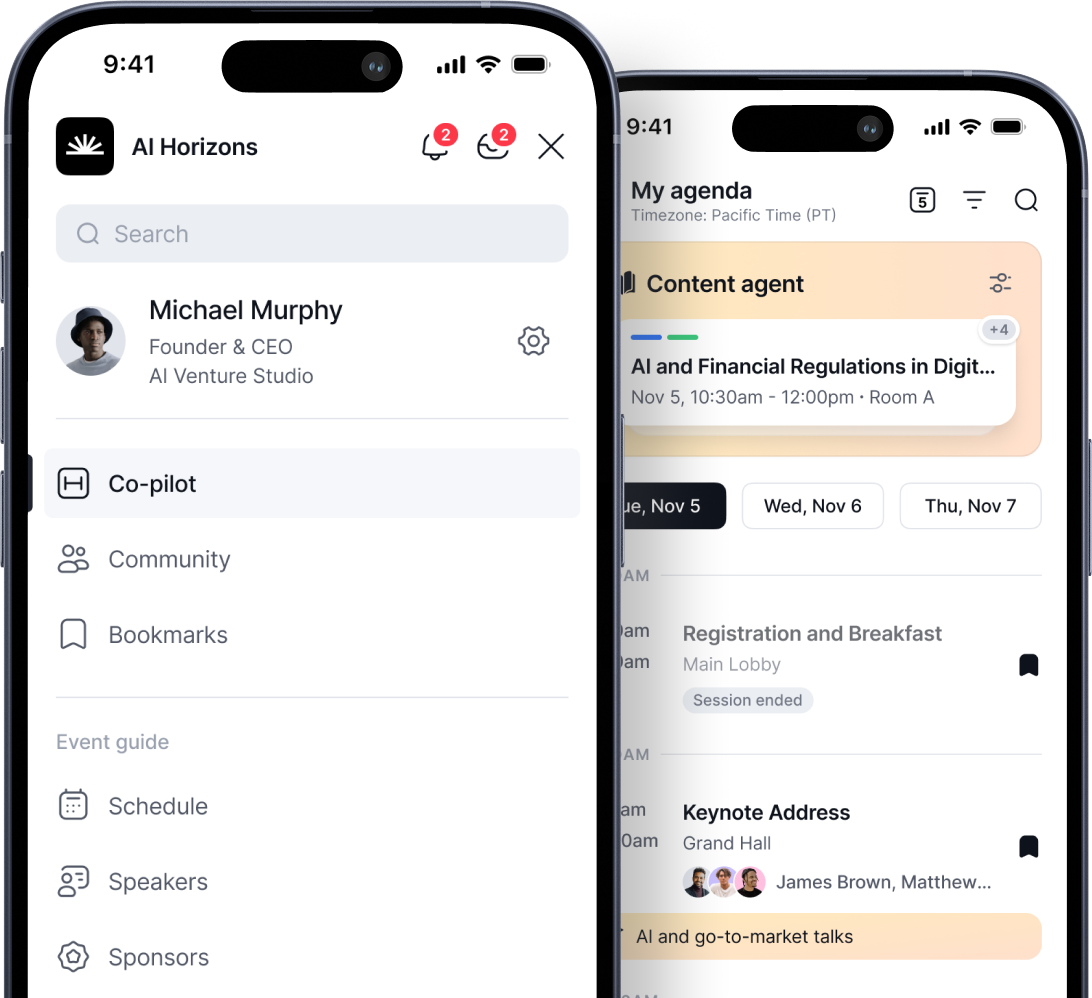
Highbar replaces menus and grids with a chatbot‑style interface powered by AI.
Attendees can:
- Ask natural language questions
- Instantly get personalized answers
- Discover sessions, speakers, and logistics without searching
Instead of learning how to use an app, attendees simply interact with it—making the experience more intuitive, more engaging, and far more modern.
.avif)
Design
Whova gives organizers meaningful branding control: custom colors, logos, and a configurable app layout. The platform has been refining its UI for over a decade, and it shows. The interface is clean and consistent.
That said, it is still the tab-based event app paradigm that has defined the category since around 2012. The bottom nav, the card-based session listings, the attendee directory, the Community Board. These patterns work, but they look and feel like an event app. Reviewers have noted that the volume of features can make the experience feel overwhelming, and that new users, particularly Android users, sometimes find navigation confusing until they have spent time in it.
.png)
Highbar is a different visual experience. The PWA interface, the conversational agent, the branded start page: they look like a modern product, not a software tool. Attendees who have never used an event app before do not need to learn Highbar. It works the way things they already use work.
Pricing
Whova Pricing
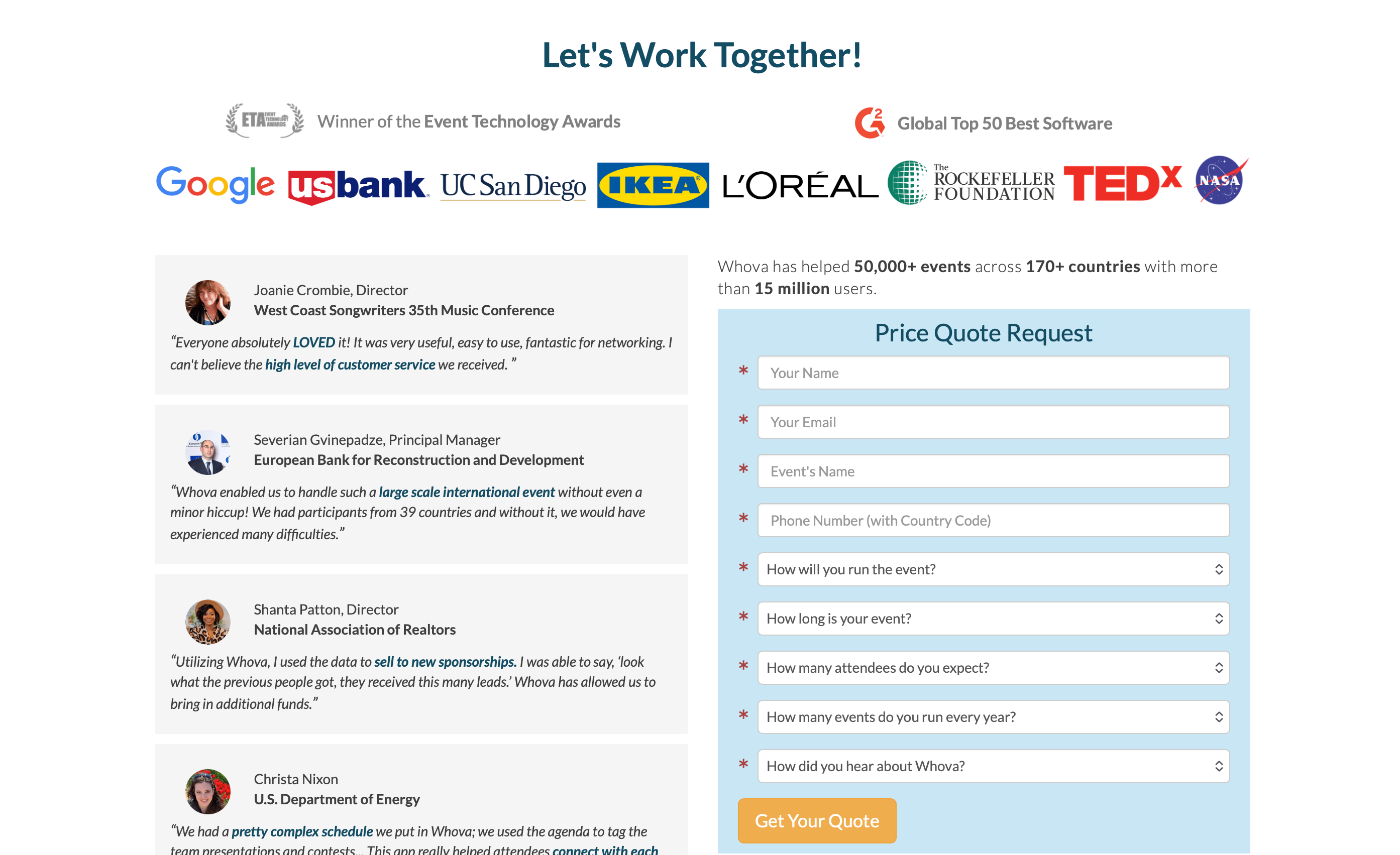
Whova does not publish prices. You submit your event details, a consultant follows up, and you get a custom quote. Two organizers running similarly sized events may pay different amounts depending on feature scope and negotiation.
The structure behind the quote has four layers. The base is a custom per-event fee covering full platform access. On top of that, Whova charges 3.0% + $0.99 on every paid ticket. Beyond that, certain features trigger add-on costs: document uploads beyond the base limit run up to $2,000 extra, based on organizer reports. And organizers running multiple events can access a promotional package by committing to several events upfront.
The core issue with Whova's model is the same issue with most event app pricing. You pay a fixed fee for the event regardless of how many attendees actually open the app. If your attendance comes in lower than expected, or your attendees do not engage, you have already paid.
Highbar Pricing
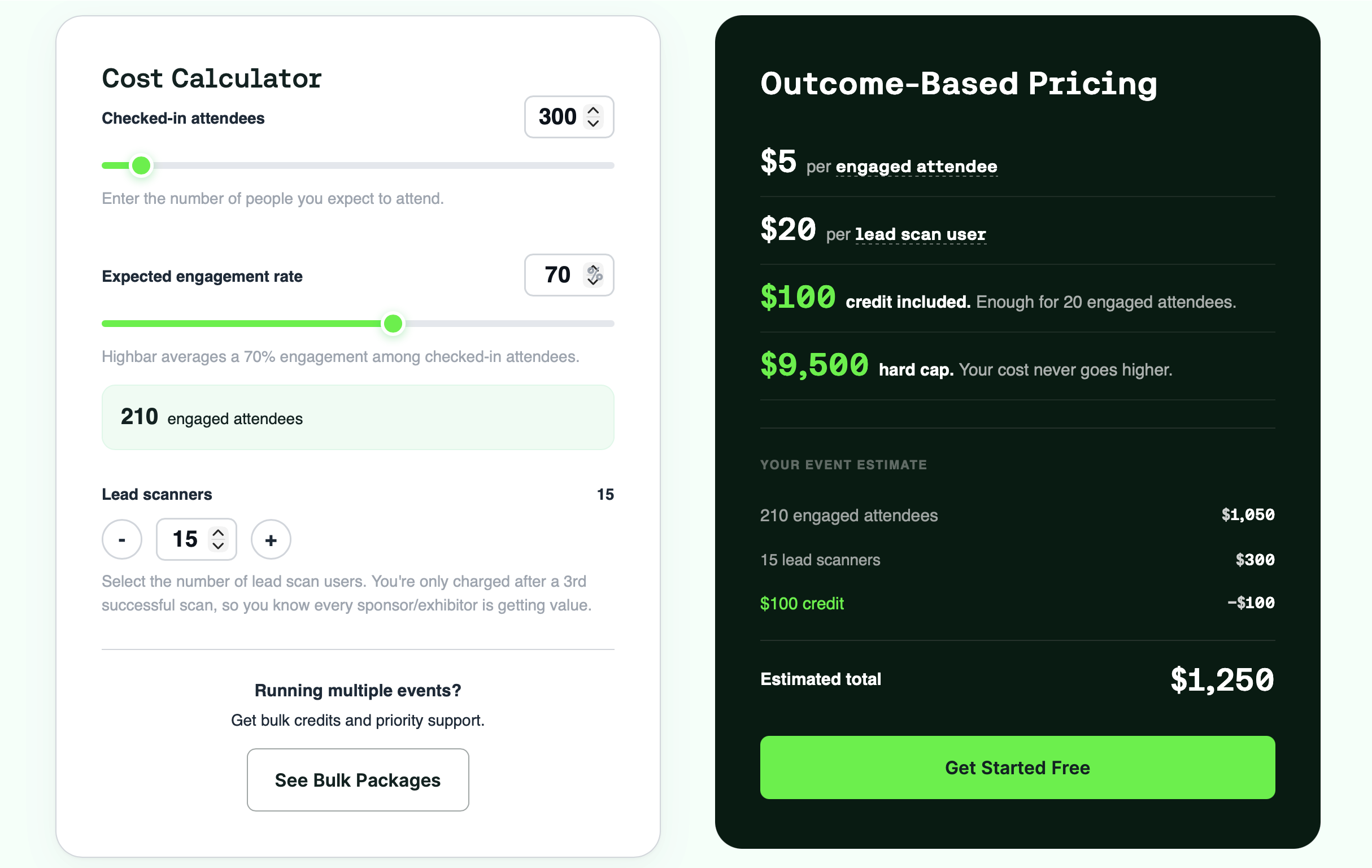
Highbar inverts that model. There is no platform fee and nothing to unlock. You build and launch for free, then pay $5 per engaged attendee, where "engaged" means someone took at least five meaningful actions in the app, like asking the AI concierge a question, bookmarking a session, or using the networking agent. App opens do not count. Your first 20 engaged attendees are free, and your total is capped at $9,500 no matter how large the event gets. If your attendees do not engage, you do not pay.
That is the difference in one line: Whova charges you a fixed fee based on event size, set before you know what you will actually get. Highbar charges you only for the attendees who actually got value, and never more than $9,500.
Takeaways
Whova is a serious platform with a real track record. If you run large academic conferences or association events, need robust exhibitor tools, and want a vendor with over a decade of experience in the space, it is a reasonable choice. The networking features are genuinely good. The nine years of industry awards are not marketing noise.
But here is what it comes down to.
Whova's networking model surfaces people. Highbar's networking agent connects them. Whova gives attendees a well-organized set of tabs to navigate. Highbar gives them an AI agent that answers their questions directly. Whova requires a sales call to get started and a contract before you go live. Highbar takes 45 minutes from signup to published.
One was built for the way events worked in 2015. The other was built for the way they work now.
You do not need a demo to find out if Highbar is right for you, and you do not need a quote to find out what it costs. Build your app for free, launch it, and pay only if your attendees actually engage.
