
6 EventsAir Alternatives for 2026
Looking for an EventsAir alternative? Here's how Highbar and other event platforms compare on registration, event websites, the attendee app and pricing.
Updated
Top EventsAir Alternatives
EventsAir competes with several other all-in-one event platforms. Here's a quick look at the alternatives event organizers most often consider:
Whova: Popular with associations and academic conferences. Registration, a website builder and a networking-first app, sold through a consultant and a custom quote. Read our full Whova comparison →
EventMobi: Established full-service vendor. Registration with no ticket fees, a website builder and an event app, with AI, a branded app and a custom domain sold as add-ons. Read our full EventMobi comparison →
Guidebook: One of the original event apps, now focused on universities. Registration, a free event website and a native or browser app, with AI limited to importing your schedule. Read our full Guidebook comparison →
PheedLoop: All-in-one platform for complex association events. Registration, website and app are separate modules, each priced per user, plus a 1.9% fee on paid tickets. Read our full PheedLoop comparison →
Amego: Enterprise native event app with a strong AI companion, Sidekick, that answers attendees and recommends people and sessions. No registration or website builder of its own: it connects to the registration platform you already use. Read our full Amego comparison →
Highbar: AI-native event platform. Registration, an event website and an event app on one attendee record, set up yourself, with published pricing. That's us, and we'll go deeper below.
What Is EventsAir?
EventsAir has been building event software in Brisbane, Australia, for more than three decades, and it is built for professional conference organizers, associations and government. It says it has powered more than 400,000 events, including meetings at the scale of APEC, the G20 and the Commonwealth Games. Few platforms can match that record on large, complex events.
It covers nearly everything in one system: registration, accommodation and travel, an event website, a mobile app, abstract management, budgets and invoicing, self-service exhibitor and sponsor portals, badging and check-in, email and SMS campaigns, a virtual portal, OnAIR, and an open API with connectors for Salesforce, HubSpot and Xero. This year it added Air Intelligence, a suite of AI assistants with a usage allowance by plan tier. The first, Planner Assistant, is live: organizers ask questions across live and past event data, from registrations to revenue, and turn the answers into charts and dashboards. An Attendee Assistant for the app and a Content Assistant for event communications are announced alongside it.
The trade-off is weight. Getting in takes a demo and a quote, reviewers describe a steep learning curve, and setup typically takes weeks. If you want the same coverage you can run yourself this afternoon, that's where Highbar comes in.
EventsAir vs Highbar at a Glance
Highbar
EventsAir
Setup

Sign up and build it yourself, live in under an hour

Demo and quote, no free trial. Reviewers report about two months to implement
Registration
Describe the flow and it is built in minutes, then edit it by hand (beta). Approvals, conditional questions and waitlists, with no training to learn it. No registration fee on the Platform plan
Drag-and-drop builder with conditional logic, waitlists, group bookings and accommodation. No per-registration fees, but a steep learning curve
Event website
Built from a prompt on your event data (beta). Your own domain included on every plan
Drag-and-drop builder with templates and a library of 500 blocks. White-labeled, but custom domains are not included
Event app
Opens from a link in any browser, in your logo and colors
A shared store app opened with an event code, in your branding. Your own store app is a custom project, quoted separately
AI
AI concierge for attendees, networking agent with a reason for every match, a website chatbot for any site, AI-built registration and website
Air Intelligence: Planner Assistant, live, answers organizers from event data with charts and dashboards. Attendee and Content Assistants announced. Usage allowance by plan tier
Pricing
Free to build and launch. $5 per engaged attendee, capped at $9,500 per event, plus $2 per paid registration, or $12,000/yr for unlimited events
Quote only. Single (1 event), Multi (up to 3) and Enterprise (unlimited), each with unlimited registrations
Registration
EventsAir: Built for Complex Events
EventsAir's registration is built for the events PCOs run. Speakers, exhibitors, sponsors, VIPs and attendees each get their own path through a drag-and-drop form with conditional branching, plus discount codes, group bookings, waitlists and abandoned-registration tracking, and a registration can be corrected in place after it's submitted. It reaches past the ticket too: accommodation, travel and seating are booked in the same flow. EventsAir Pay is built into the form, taking cards, Apple Pay, Google Pay and WeChat Pay with no redirect.
EventsAir charges no per-registration fees on any plan, only payment processing, which it doesn't publish. That beats Highbar's $2 per paid registration on a single event, and it is worth saying plainly. The catch is the build: this much depth takes training, and reviewers mention a steep learning curve.
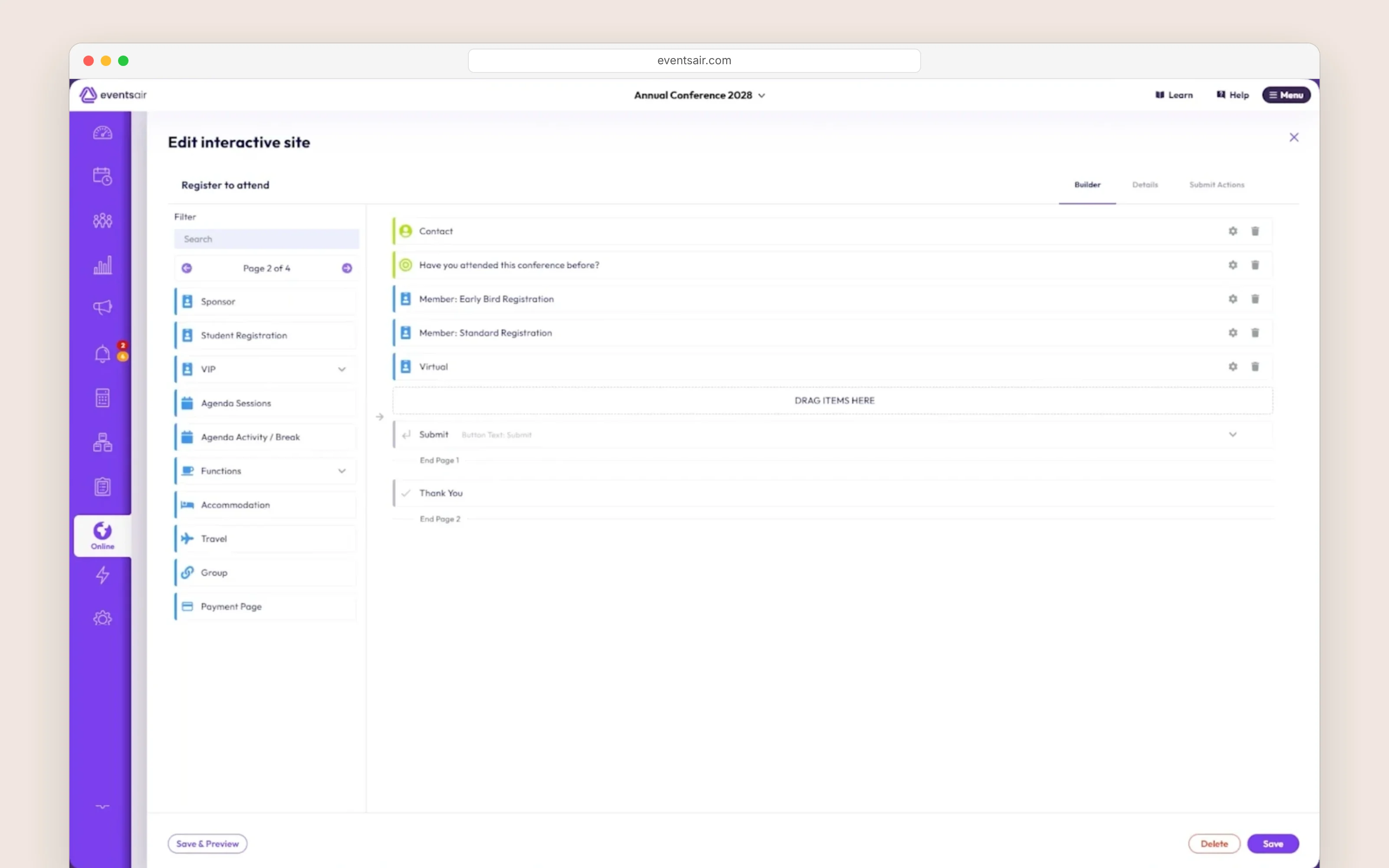
EventsAir's registration builder
Highbar: The Flow, Without the Training
Highbar gets you to a working flow without a course first. Registration is live in beta: describe it in a sentence (three ticket types, a speaker pass unlocked by code, sponsors approved before they pay, a dinner question only some guests see) and it is built. Then refine any step by prompt or on a visual canvas.
Payments run on Stripe with card fees at cost, for $2 per paid registration on a single event, or nothing on the Platform plan, which matches EventsAir's no-fee model. Confirmed registrants land on the app's attendee list on their own, so the app and the follow-up start from the same record.
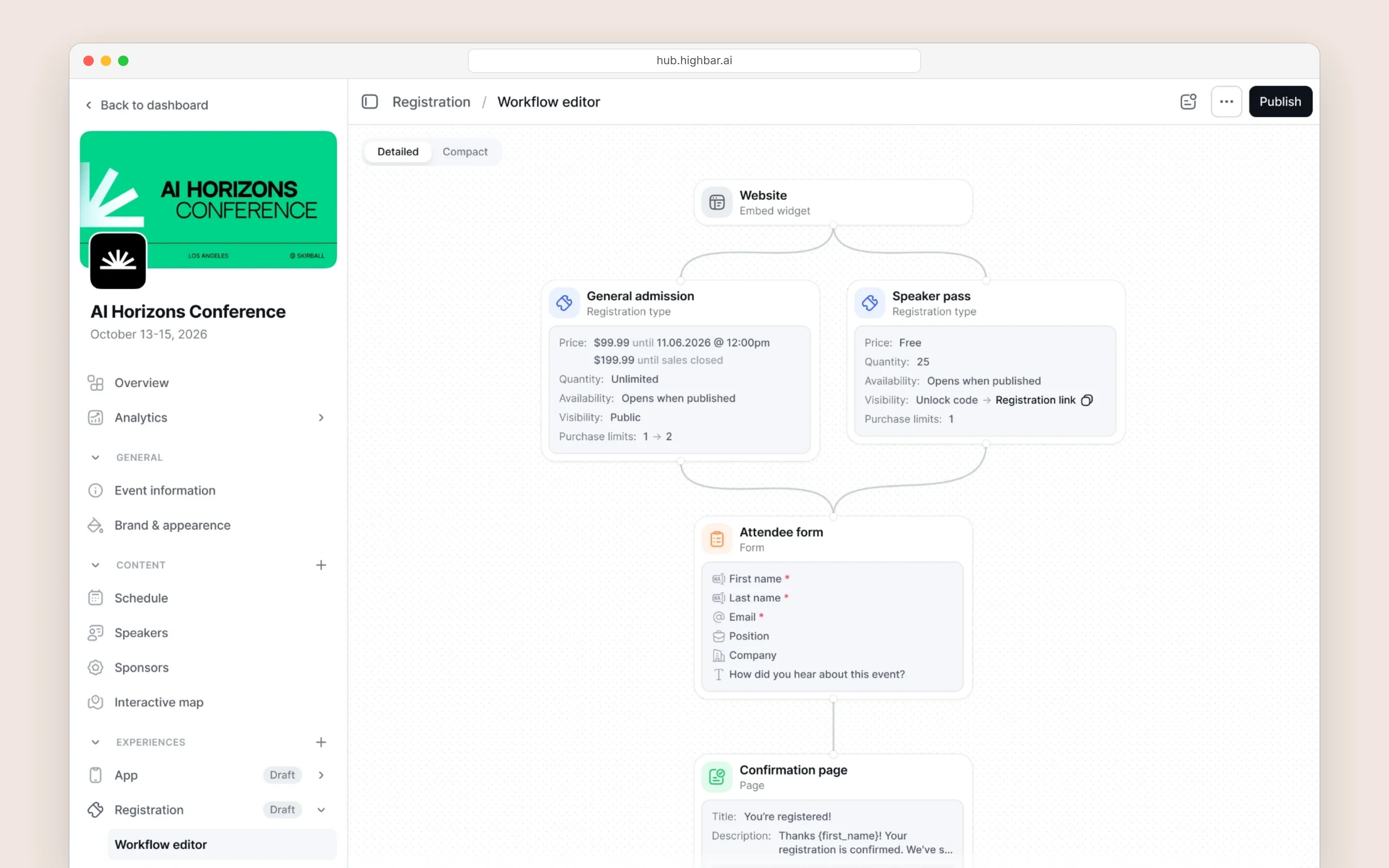
Highbar's registration builder
Event Website
EventsAir: A Library of Blocks to Drag In
EventsAir's website builder works without code. You start from a template or a blank page and drag in blocks from a library of about 500, in light and dark styles: heroes, features, countdowns, maps, image carousels and videos. You can save your own blocks, swap color schemes, preview each device, and set each page's search title and description, with translation and accessibility built in. The agenda and speakers come straight from EventsAir, so a session change made there shows on the site. White labeling is included, but EventsAir's plans say custom domains are not. It is a capable builder, and like the rest of EventsAir, it rewards a team that has learned it.
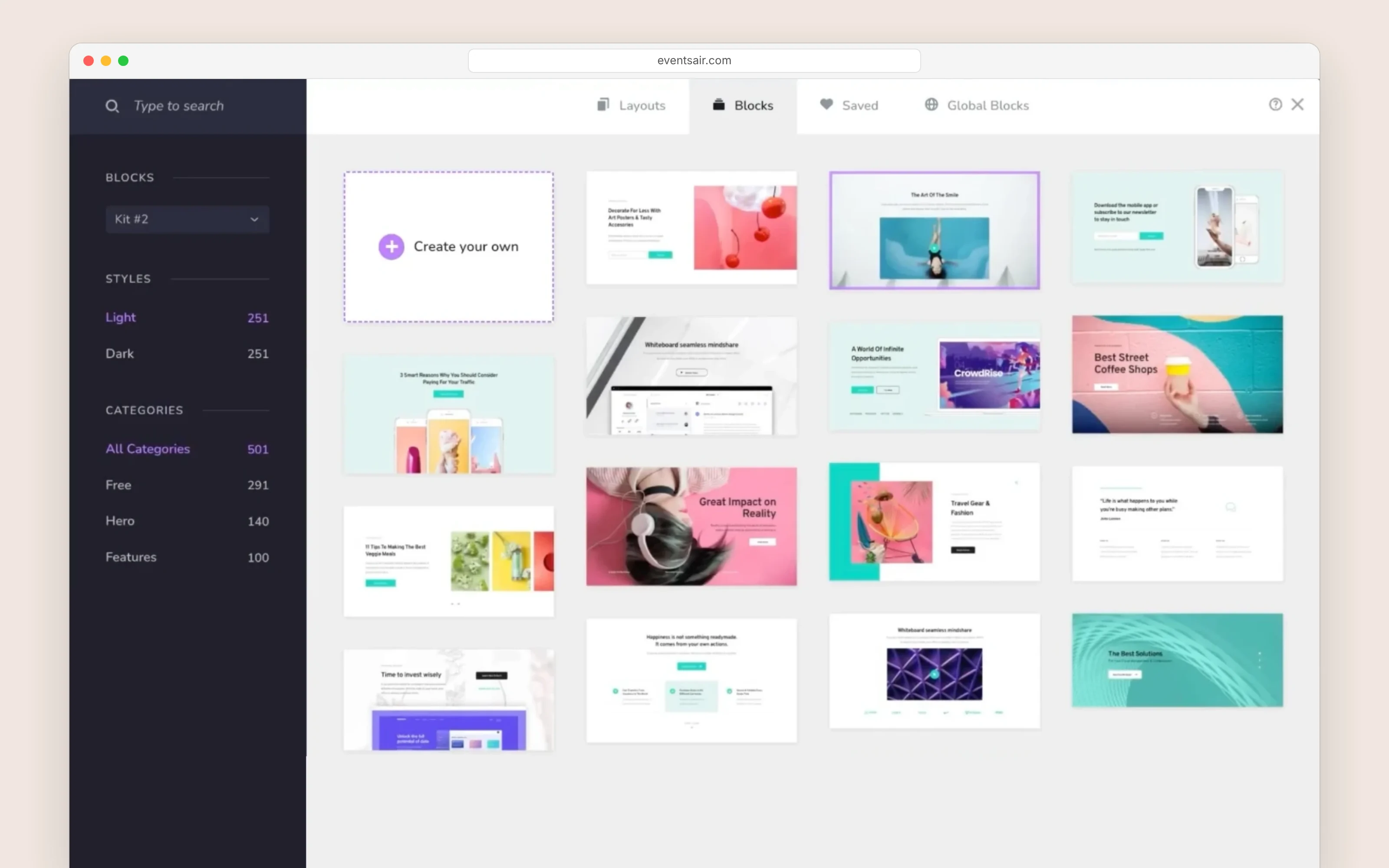
EventsAir's website builder
Highbar: Describe the Site Instead of Assembling It
With EventsAir you pick from 500 blocks and arrange them. With Highbar you describe the page instead. Its event website, live in beta, is built from a sentence (a hero that leads with your keynote, an agenda filtered by track, a sponsor wall ranked by tier), and the agent changes any section when you ask, or you edit it by hand.
Every session, speaker and sponsor on the page comes from your event record, registration sits inside the page, and it publishes on your own domain, included on every plan. Keeping a site you already have? Highbar's website chatbot goes on it with one snippet, free on every plan.
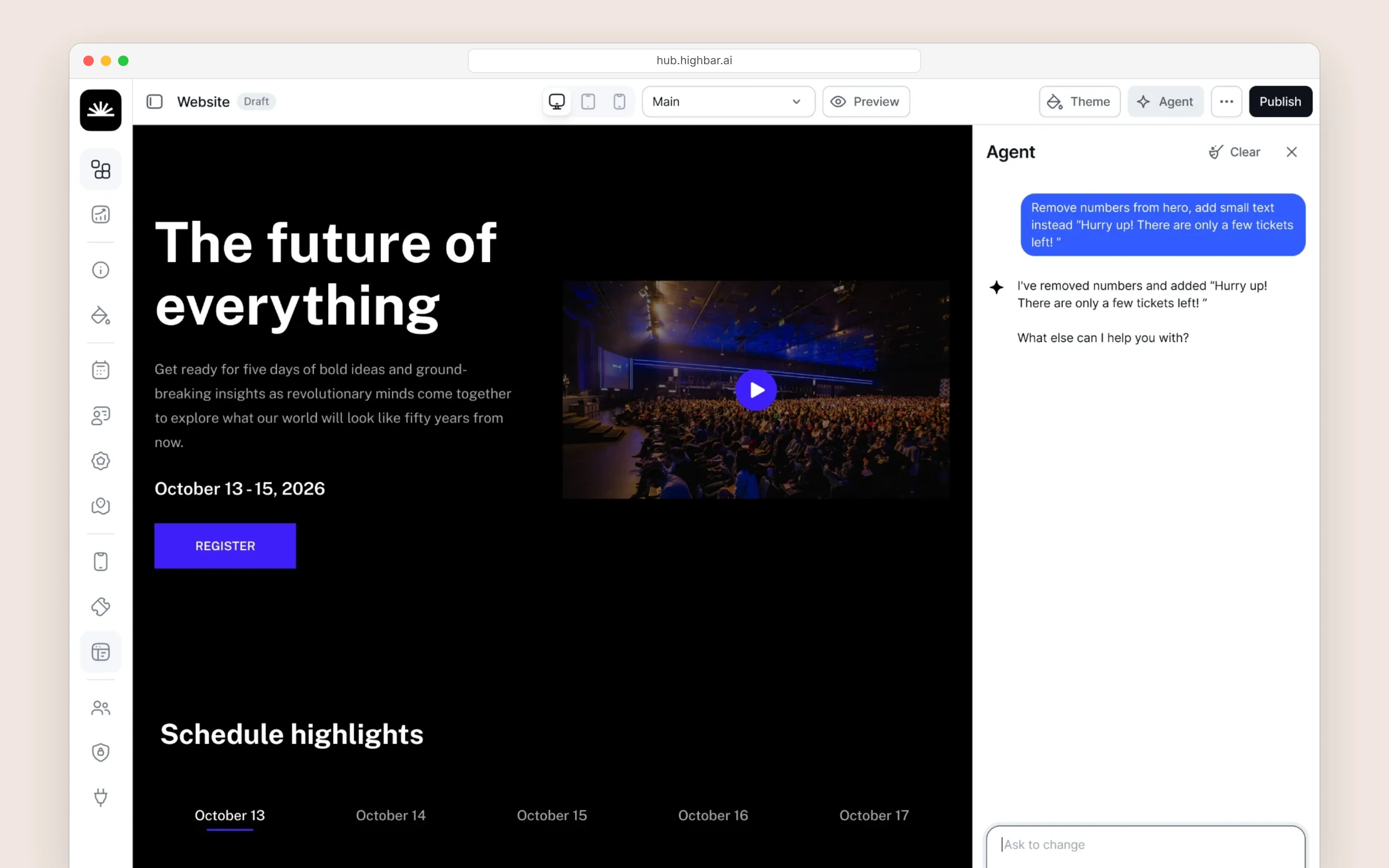
Highbar's website builder
Event App
EventsAir: A Store App, Branded or Your Own
Attendees download The Event App by EventsAir and enter an event code. Inside, your logo, colors and fonts carry the brand, and the app covers agendas, floor plans, polls, Q&A, gamification, messaging, 1:1 meetings and badge scanning. For an app under your own name, EventsAir builds a custom one on your developer accounts, quoted separately and subject to store approval.
An Attendee Assistant is on the way: EventsAir has announced one that will answer questions and recommend sessions and sponsors from each attendee's profile, counted against your plan's AI allowance. What attendees use today is rated 1.8 to 2.2 out of 5 on the App Store (November 2026), and reviews mention slow loading, freezing and a schedule that jumps back to the top.
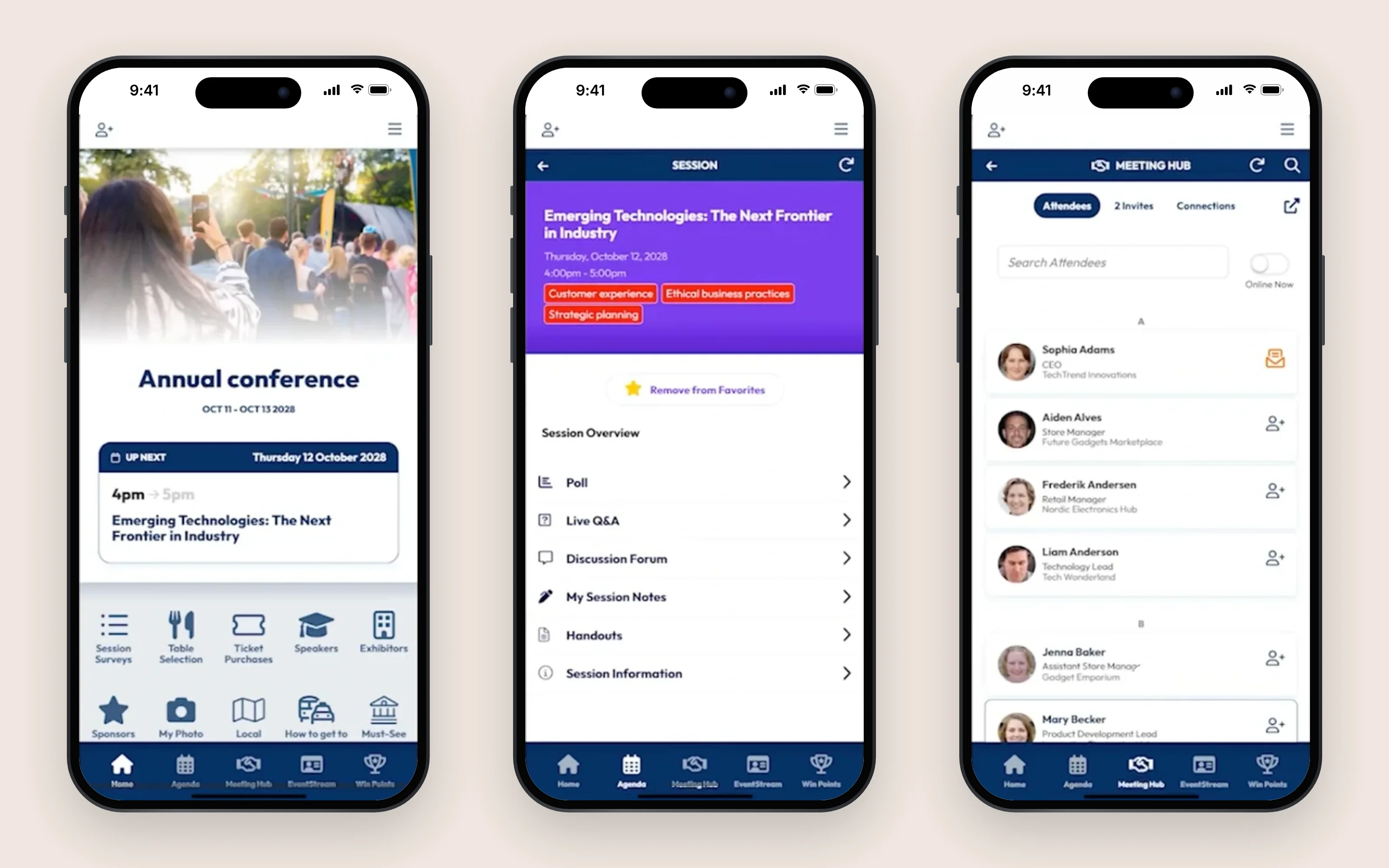
EventsAir's attendee app
Highbar: No Store, No Code
Highbar starts with a link. The app opens from a QR code or a link in any browser and carries your event's name, logo and colors, with no store listing, no event code and no separate project to quote. You shape the start page around what matters at your event, a keynote, a sponsor, a room change, and see every change in a live preview.
Inside, the AI concierge is the center of the app rather than one feature in it. It answers attendees from the event's own sessions, speakers, sponsors and FAQs, and from their own agenda. Beyond sessions and sponsors, the networking agent suggests people worth meeting, says why, and books a time and a table under the rules you set. Every part of it, AI included, works the moment you publish.
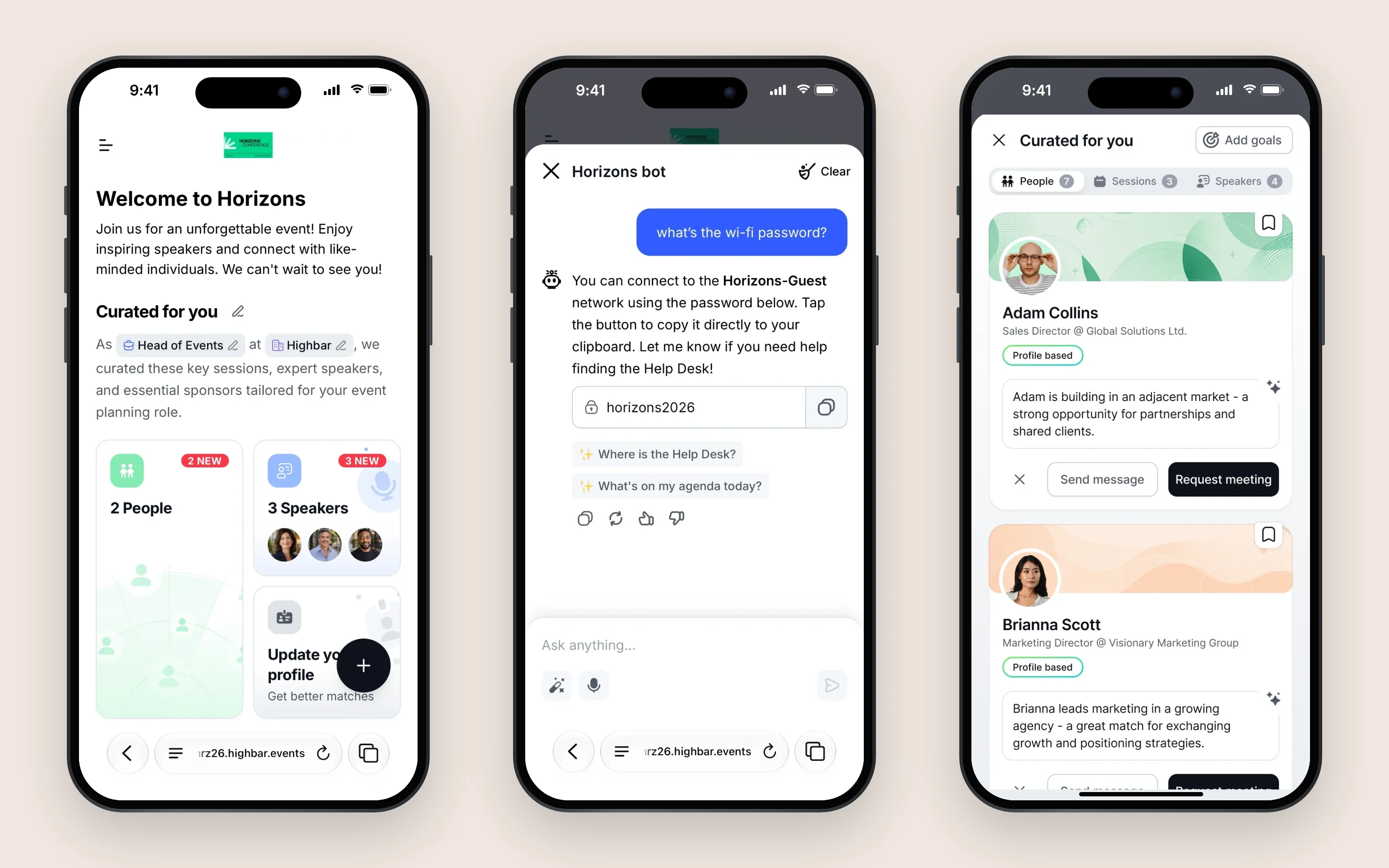
Highbar's attendee app
Pricing
EventsAir Pricing
EventsAir doesn't publish prices. Its plans are Single (one event, up to three users), Multi (up to three events, unlimited users and unlimited smaller events under 100 attendees) and Enterprise (unlimited events). Every plan includes unlimited registrations and the full platform, and every one ends in a Request pricing button: the number comes in a quote after a demo, and there is no free trial.
Its plans include abstract management, accommodation and travel, lead capture, white labeling, training and an account manager. Outside them: custom domains, Smart Connectors to other systems, unpublished payment processing fees, and AI beyond your tier's allowance. What you can't do is see the number, or try the platform, before a sales conversation.
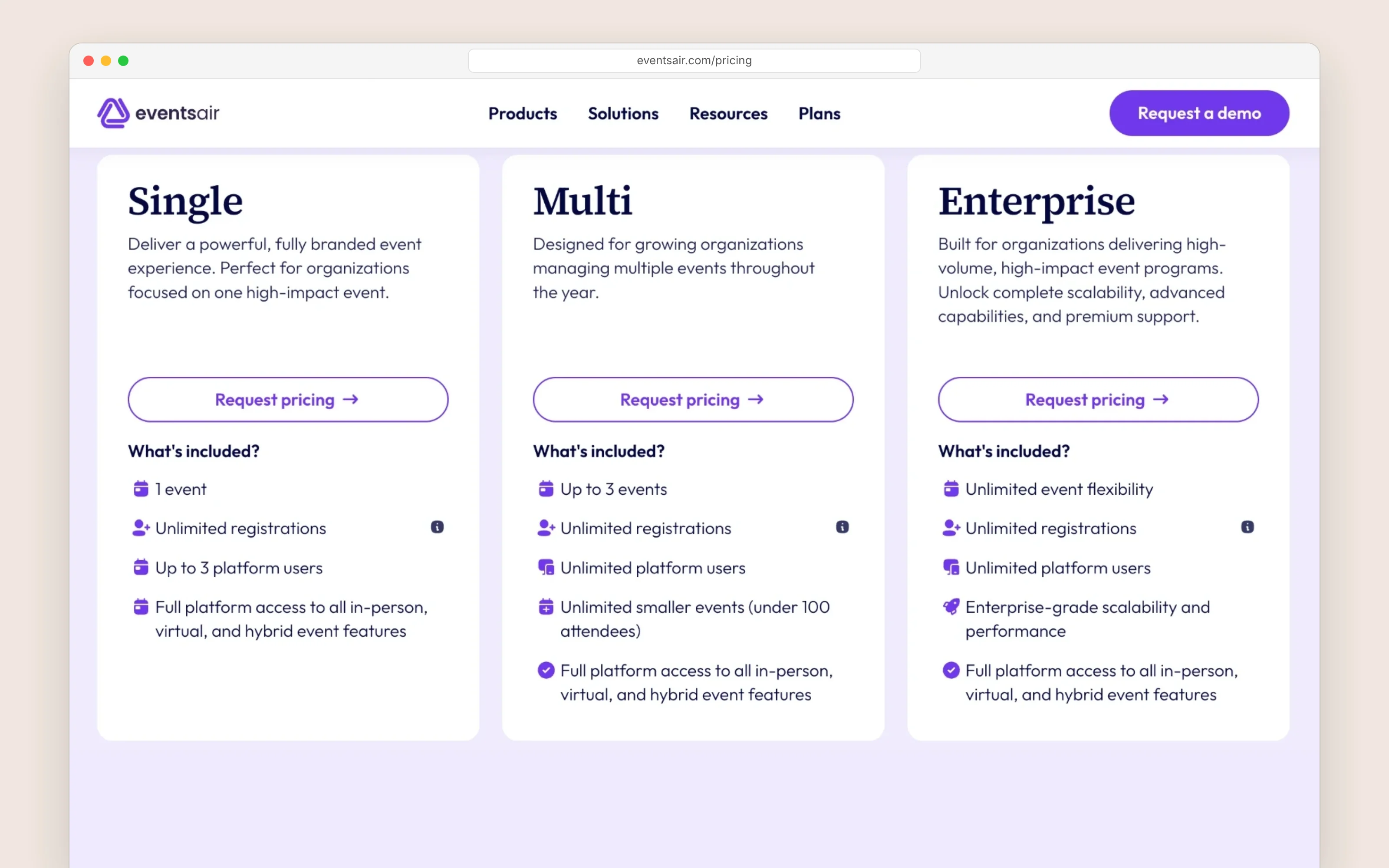
EventsAir's pricing page
Highbar Pricing
Highbar puts every price on its pricing page, with no demo needed to see it. Building and launching are free. A single event costs $5 per engaged attendee, capped at $9,500, plus $2 per paid registration. The Platform plan is $12,000 a year for unlimited events, websites and apps, with 3,000 engaged attendees included and no registration fees.
AI, the website chatbot and your own domain come in every plan, and you can build and launch an event before you pay anything, in under an hour.
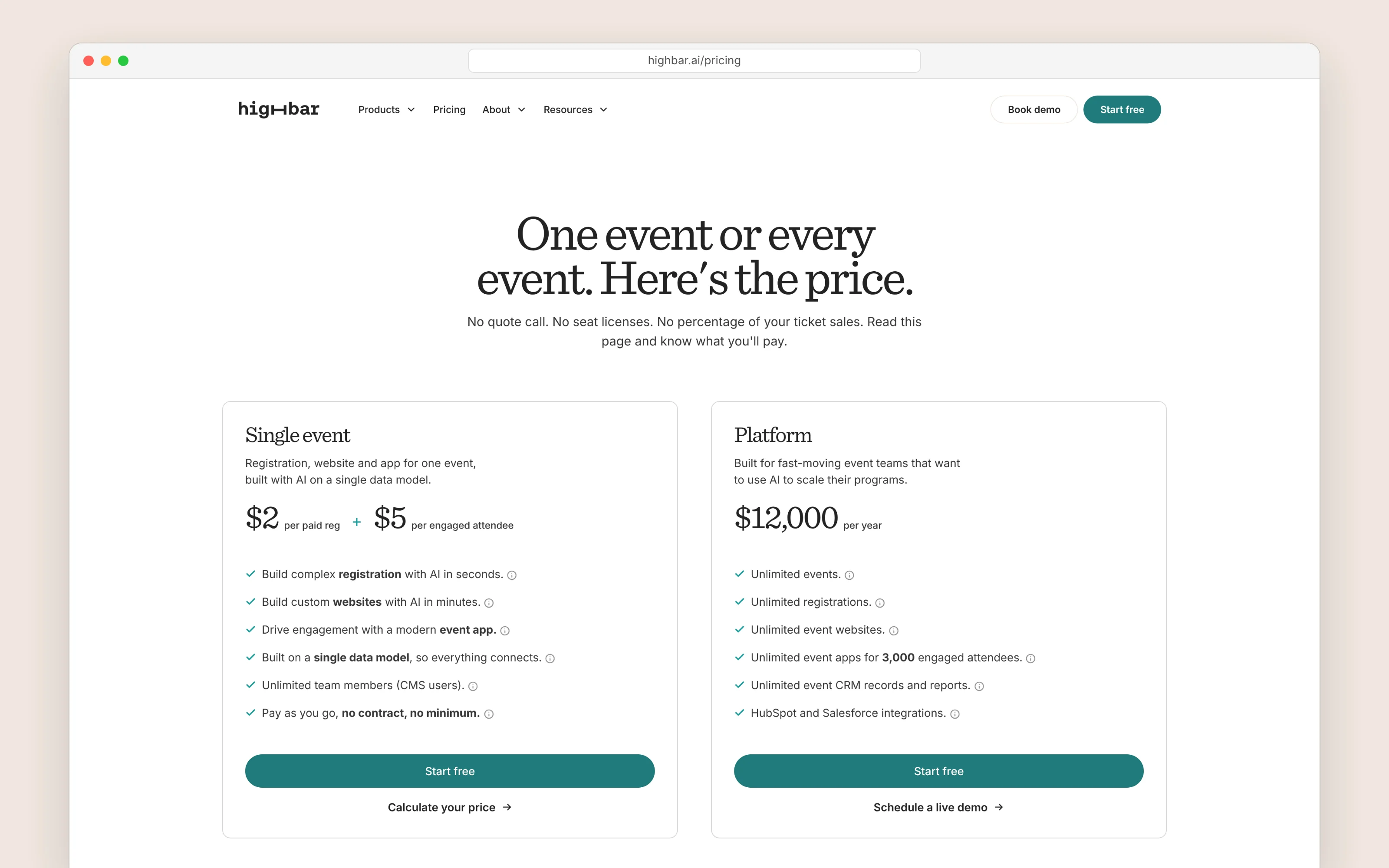
Highbar's pricing page
EventsAir vs Highbar: Which Should You Choose?
EventsAir is a serious, long-established platform with a record few vendors match. If you are a PCO or a government team running large, multi-day events with accommodation, travel and onsite logistics, and you have people to learn the system, it is a reasonable choice. Its no-fee registration, logistics and abstract tools are real strengths.
But here is what it comes down to.
EventsAir gives you breadth that takes a demo, a quote and weeks of setup to reach. Highbar gives you registration, a website and an app on one record that you build yourself, with an AI concierge at the center and attendees in with one tap.
You do not need a demo to find out if Highbar is right for you, and you do not need a quote to find out what it costs. Build your event for free, launch it, and pay only if your attendees actually engage.

Frequently asked questions
How is Highbar different from EventsAir?
Both cover registration, an event website and an event app. EventsAir is a deep, long-established platform built for PCOs and large government events, sold through a demo and set up over weeks, with a store app attendees download, shared or custom-built under your name. Highbar puts the same three on one record you build yourself in under an hour, with an AI concierge at the center of an app that opens from a link.
How does Highbar pricing compare with EventsAir?
EventsAir doesn't publish prices. Its Single, Multi and Enterprise plans, for one event, up to three, or unlimited, are priced through a quote, with unlimited registrations and no per-registration fees. It says call for proposals, the app, lead retrieval, exhibitor tools and white labeling are standard, and payment processing fees apply on top.
Highbar publishes its prices. A single event costs $5 per engaged attendee, capped at $9,500, plus $2 per paid registration if you sell tickets. The Platform plan is $12,000 a year for unlimited events, with 3,000 engaged attendees included. Highbar never takes a percentage of your ticket revenue.
How long does it take to launch compared with EventsAir?
EventsAir starts with a demo and a quote, with no free trial, and reviewers report about two months to implement. On Highbar you sign up, follow the guided setup, and publish in under an hour, without a sales call.
Do attendees need to download an app?
EventsAir attendees download The Event App by EventsAir from the App Store or Google Play and enter an event code, or download a custom app EventsAir publishes under your own name, quoted separately. Highbar's event app opens from a link or a QR code in any browser, with no app store and no download, so attendees are in with one tap.
Can I move my existing event content to Highbar?
Yes. If you can export your sessions, speakers, sponsors and FAQs to a spreadsheet, Highbar's importer brings them in from CSV or XLSX files. You don't need a template: it reads your column headers, suggests where each one goes, and shows you every row to check before anything is imported. Building and launching are free, so you can see your event running before you pay anything.
When is EventsAir the better choice?
If you are a PCO or a government team running large, multi-day events with accommodation, travel and onsite logistics, and you have people to learn the system, EventsAir is a reasonable choice. Its no-fee registration, logistics and abstract tools are real strengths.

See your own event running on one system.
Build it yourself in under an hour, or have us walk you through it.